Edit the platform to suit your needs.
New
Learn about the new Webmail interface with a revamped design making it accessible and easy to use.
A service tailored just for you
Access your mailboxes at any time and take advantage of first-time onboarding to navigate the interface with ease from the start.
Customizable
Fully responsive
Get the best user experience from any device.
Accessible
Make sure all users can manage their mailboxes easily.
Much more than just a web platform
Calendar
So you don't forget any appointments in your schedule.
Address books
For saving your contacts and sorting them by lists.
Tasks and notes
For monitoring tasks and creating notes.
Multi-account
For managing up to 4 mailboxes (even external to Aruba) from a single panel.
Blocked and safe senders
For setting up lists from which you won't receive messages or those verified as trustworthy.
Folders and Antispam filter
To better organize emails and identify unsafe messages.
Browse the gallery to discover all the features of Webmail
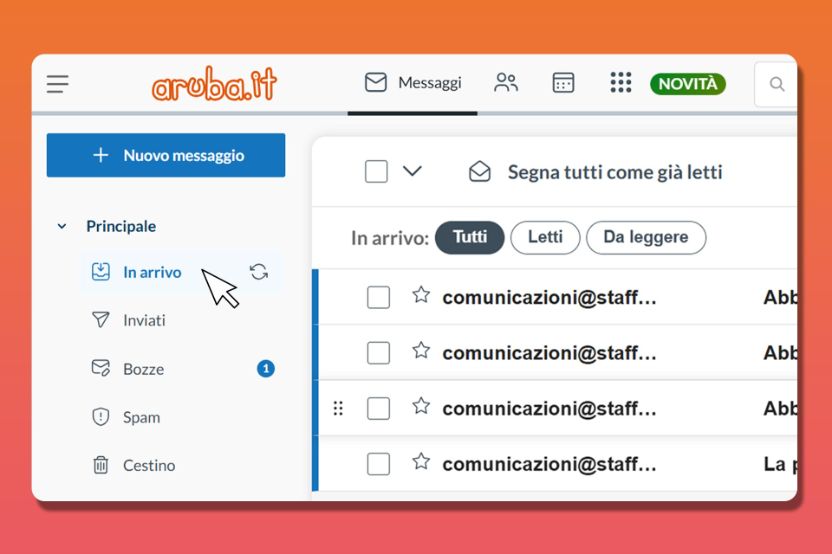
Inbox
Manage and monitor all incoming messages in an organized and efficient way.
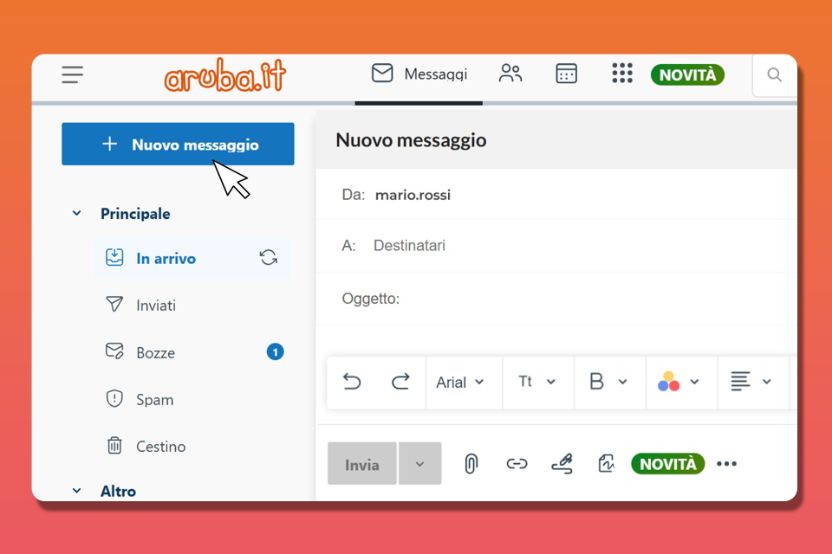
Writing editor
Write emails and messages with a modern, intuitive interface centered for easy writing.
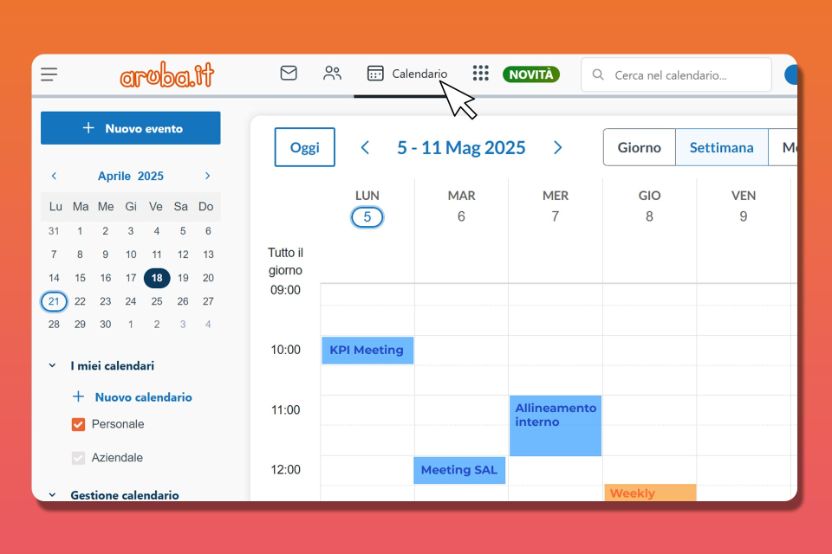
Calendar
Keep track of your events and appointments without missing anything.
Customize your Webmail
Configure storage, number of mailboxes and features according to your needs.
Business Mail
Turn your Webmail into a professional tool by taking advantage of the many built-in tools and features for more efficient email management.
GigaMail
Increase your mailbox storage. Distribute additional 5 GB storage packages as you wish, up to a maximum of 50 GB per mailbox.
Unlimited Email Storage
No more worrying about storage thanks to a mailbox with unlimited capacity to send or receive as many messages and attachments as you want.
Get the best with a professional tool
Choose Business Mail and transform your Webmail into the ideal platform for managing your work with new integrated features.
- Security archive
Dedicated storage in which to save and protect an automatic copy of messages and attachments sent or received. - BAM (Big Attachment Message)
Allows you to send large attachments, even downloading them via links if they exceed the maximum size. - Company calendar and address book
Contacts and appointments can be shared with all domain mailboxes. - Sharing
Share contacts, files, notes, etc. with other email addresses in the same domain. - File storage
Extra space is available on the server, equal in size to the mailbox, for uploading, editing and saving files. - Multiuser
Share mailboxes with multiple users with the same domain, each with their own access rights.
Manage everything from one place

Integrated Digital Signature
With the Digital Signature service, you can directly sign your documents or files received as attachments, without installing signature software or apps.

Integrated Aruba Drive
The Aruba Drive service lets you attach documents or files in your cloud storage to your emails or save them from your mail automatically to the drive.